Repetitive tasks can eat into time you wanted for friends, family, getting outside or a quieter evening. AI is worth exploring when it reduces that effort without creating more checking and maintenance.
A single conversation may be enough. A recurring task might benefit from a repeatable workflow. Some tasks justify an agent that chooses its next steps and uses connected tools. Start with the simplest approach you can check. The examples here are proposed ways to organise work, not tested integrations or measured time-saving results.
In this article
In this article 8 sections
What is the difference between AI agents and automation?
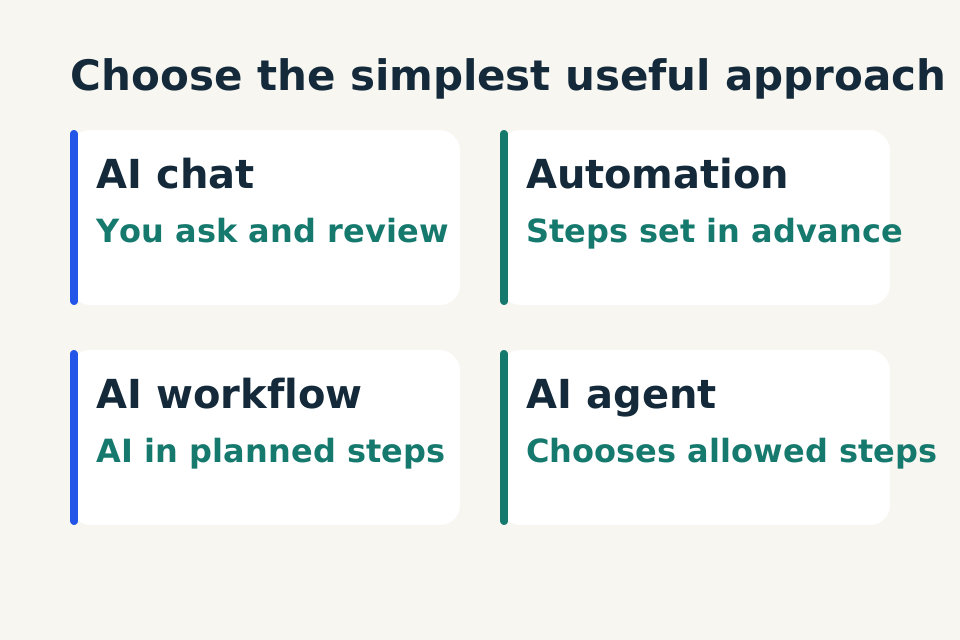
Rules-based automation follows steps and conditions you define. An AI agent can choose its next permitted step or tool while pursuing a goal. Between them, an AI-assisted workflow uses AI within a planned sequence. More freedom is not automatically more useful: start with the simplest approach that meets the task.
Scroll the table to compare all columns.
| Approach | How the next step is chosen | Example to explore |
|---|---|---|
| AI chat | You request and review each result | Draft a meal plan |
| Rules-based automation | Predefined conditions select the action | Trigger a fixed reminder |
| AI-assisted workflow | A planned sequence includes an AI step | Extract enquiry details for human review |
| AI agent | The system selects permitted next steps or tools | Choose among approved sources to investigate a question |
These are illustrative task patterns, not tested integrations. Anthropic describes the distinction between predefined workflows and dynamically directed agents in Building effective agents.
Understand the four options
A simple AI chat helps you think, summarise or draft. You provide information, review the answer and decide what happens next. Asking for dinner ideas fits here.
Rules-based automation follows defined conditions: when this happens, do that. A calendar reminder or a form copying fixed fields into a spreadsheet may need no AI. The steps are specified in advance, although the setup still needs testing.
An AI-assisted workflow follows a planned sequence with AI used for a particular step. For example: collect an enquiry, extract requested services, flag missing details and present a draft for review. You can try the sequence manually before connecting software.
An AI agent can choose which permitted step or tool to use next while working toward a goal. Anthropic distinguishes predefined workflows from agents that dynamically direct their process and tool use. That distinction is useful even though product labels and implementation tools vary.
These options can coexist. A workflow can contain an AI step without giving it freedom to manage the whole task.
Choose one small result
Write: “When I receive these inputs, I want this output, which I will check before this action.”
For a service business: “When an enquiry arrives, I want a job brief and missing-detail list, which I will check before replying.” At home: “When I provide ingredients and busy evenings, I want a meal-plan draft, which I will check before shopping.”
Prefer a task with a clear finish and mistakes you can spot. Avoid starting with “manage my business.” If a checklist already handles the task well, keep it. If a chat solves it, there is no obligation to automate it.
Ask whether the next step needs judgement
If inputs are structured and steps stay fixed, start with rules. If the sequence stays fixed but the language is messy, consider an AI-assisted workflow. If the next step depends on information discovered along the way, an agent may be worth evaluating.
Extracting facts from an enquiry does not automatically need an agent. An agent becomes more plausible if it must choose among approved sources to resolve a question. That additional freedom should solve a specific problem, not merely make the setup sound advanced.
Define boundaries before connecting tools
For the enquiry example, the first version can produce a brief and draft reply. It should not quote a binding price, confirm availability, book work or send a message. A person checks those decisions.
Reading a document is different from editing records or spending money. List allowed reads, allowed drafts and actions needing approval separately. Check the actual permissions requested by each integration; a broad prompt is not a substitute for access controls.
Use fictional data while learning. Review data handling and workplace requirements before introducing customer or private household information.
Plan an honest failure response
What happens if a page does not load, a calendar is unavailable or a required detail is missing? A useful first version stops the affected step, says what it could not establish and returns control to you.
It should not claim a booking succeeded without confirmation or silently expand its access. For a connected workflow, decide how you will see failures, stop future runs and inspect what actually happened. Do not assume a product provides those controls until you verify them.
Compare effort, cost and reliability
Include setup, checking, corrections and maintenance when comparing an AI-assisted approach with the manual task. For paid tools, check current subscription, usage and connected-app charges in the relevant currency. No paid plan is required to write the task brief.
Test ordinary, missing-information, contradictory, duplicate and unavailable-source cases. Define expected outcomes before running them and repeat important checks. A fluent completion message is not proof of an external result.
Take the smallest next step
Choose one recurring task and map its input, output and human decision boundary. Try it manually with a clean prompt. If it helps, save the routine and collect evidence before adding integrations.
Your eventual goal may be useful agents of your own. Starting with a task you understand gives you a better foundation for deciding what to delegate and what to keep under your control.
Turn your chosen task into a testable plan with the AI workflow planning worksheet.